Changed a name or a term: how to retranslate passages that still use the old wording
Tri Thu知秋
On this page
- After changing a table entry, which parts pick up the new wording?
- Which translated lines still miss the new wording?
- What does retranslating one line change, and what does it cost?
- When to retranslate one line, when to retranslate the whole chapter?
- Four levels of change, four levels of cost
- What does not update by itself
You translated a few chapters, then decided to rename an item, change how a technique is called, or revise a term's translation. Saving the new wording in Names & terms does not change the chapters you already translated. To update the old part, you retranslate the lines involved or the whole chapter. This article shows how to find the lines that need work and pick the retranslation scope. It is a paid AI translation run: the whole sentence can change, not just the word you replaced.

My demo project runs five chapters, Chinese source, translated into Vietnamese. In its name table, the entry I focus on is 封息阵. At scan time the model proposed "Phong Tức trận", a faithful, character-by-character carry-over of the source order. I nodded it through, because the name sounded fine on its own.
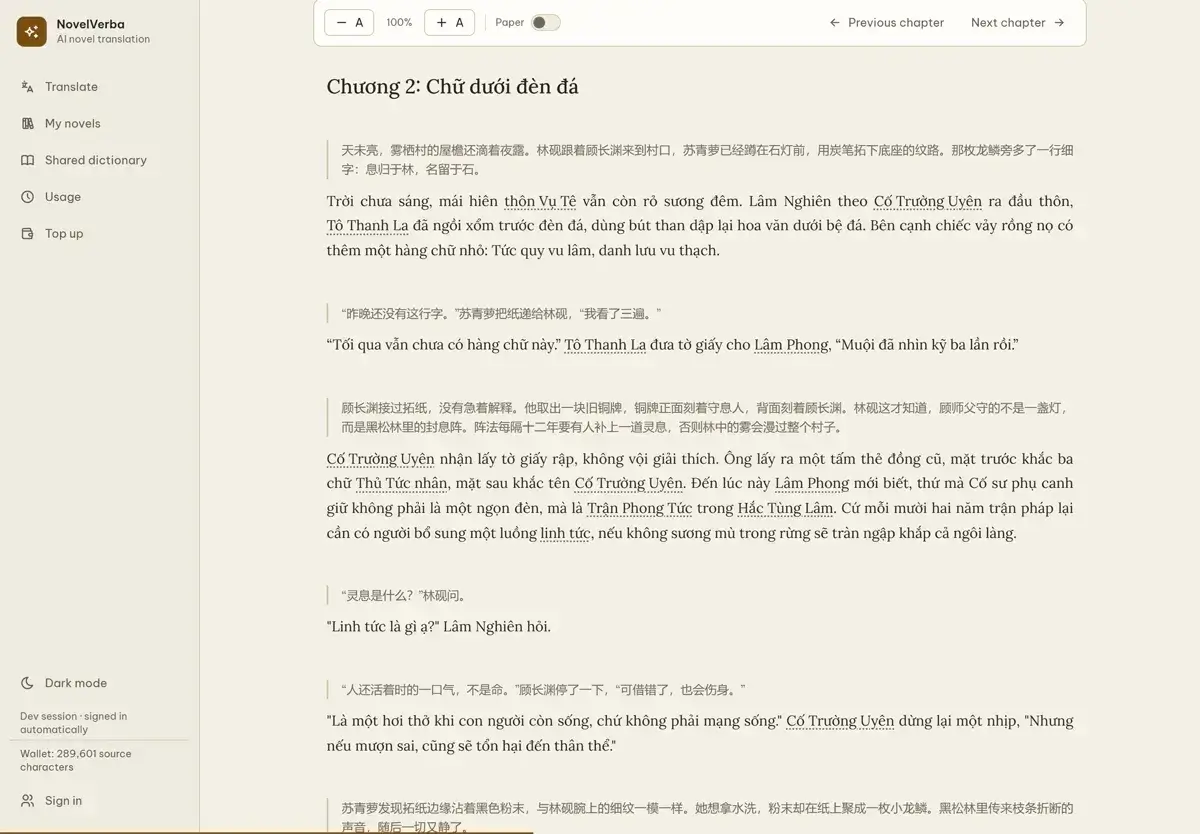
Only when I reread chapter 2 did the sentence land as: "…what Master Cố guards is not a lamp, but the Phong Tức trận in Hắc Tùng Lâm." Skim it and it flows. Read it closely and it stumbles: Vietnamese puts the classifier first, a formation is Trận Phong Tức, not Phong Tức trận. The name I approved carried the syntax of the source language into the exact spot where a reader needs a natural noun.
Here, the old name came from the decision I had approved in the table, not a choice that appeared inside the translated chapter. That decision can still be changed, but a chapter that already uses the old name needs its own handling: how far is it affected, and how much fixing is enough?
After changing a table entry, which parts pick up the new wording?
The first step is still fixing the decision: in the Names & terms table I edited the 封息阵 entry, changed "Phong Tức trận" to "Trận Phong Tức", saved. The screen says exactly one thing about it: "Edit names here; later translated chapters will use the new names."
That sentence has a flip side I went and checked immediately: chapters ALREADY translated. I reopened chapter 2. Still "Phong Tức trận", word for word as before the save. A translation already written into a chapter does not go back to visit the table. If you want a whole batch to follow the new table, the next batch has to be a new one; line fixes and chapter retranslations read the table live, at the moment they run.
Which translated lines still miss the new wording?
Fixing blind means paying twice. On the same Names & terms screen there is a "Check by line" button: it compares each source line that contains a name from the table with its translated line, then lists the lines missing the approved version. Read-only, it charges no AI calls. It reported exactly the one thing I needed: the project has one translated chapter, and 封息阵 → Trận Phong Tức is off in 1/1 of its lines, chapter 2, line 7.
A sixteen-line chapter, one wrong line. The report changes nothing and swaps no names by itself: it only measures the scope. That number decides how far to retranslate. When the misses are scattered, the list in the report carries only a few sample lines to recognize them by; the number to trust is the total drifted-line count of each entry, and the exact character count of the fix shows up at the fee confirmation, before you run it.
What does retranslating one line change, and what does it cost?
"Fix line" takes me to the exact spot in the chapter with the wrong line already highlighted. The confirmation states the cost up front: the selected line plus a few lines of context around it (three before, two after), billed in source characters, one small call. My run cost 148 source characters; retranslating the whole chapter of this novel would be about 400 source characters. A third of the cost, for one line instead of the whole chapter.
Retranslation draws from the same credit balance as the main translation. How to estimate credits for a whole novel, and when credits are returned, is covered in Novel translation cost with AI: what you pay, and do you lose credits if it fails midway? How the free trial credit is counted is covered in Free AI novel translation trial: how the 200,000 source-character credit works, and one-time top-up packages are covered in Topping up novel translation credits: one-time packages, international cards via Creem, and credit expiry.
The new line is not a one-word patch: this is an AI translation run, so the model retranslates the whole sentence against the current table: "Trận Phong Tức" lands where it belongs. Because the whole sentence is retranslated against the current table, other names or terms in the same sentence can change too. A narrow fix replaces the entire sentence under the new decisions; it does not swap three characters and leave the sentence bent in some other way.
When the run finished, the app reported the line had been replaced and the rest of the chapter untouched, and I reread it to be sure, because that is the whole point of the word narrow: only the selected line is overwritten; the other fifteen keep every mark.
When to retranslate one line, when to retranslate the whole chapter?
Line fixing has a cap: at most two hundred lines per run. The cap exists for an economic reason, when errors spread thick, many small calls cost more than one big one. When the mismatch list is longer than the cap, or the errors are scattered across the chapter, "Retranslate this chapter" is the right road: it overwrites everything, shows a clear warning that the current translation will be replaced, and bills like a fresh chapter translation.
The rule I keep for myself: count first with the line check, decide second with the numbers. Fewer than ten wrong lines, fix the lines. Thicker than that, send the whole chapter back through translation and read it once. Never fix on the assumption that a freshly saved table will go clean up the old parts. It does not do that, and it should not: a translation does not change behind a reader's back.
Four levels of change, four levels of cost
| What changes | What it touches | How | Real cost in this demo run |
|---|---|---|---|
| One name or term in the table | Every chapter in a new translation batch | Edit the entry in Names & terms | 0, saving the table only |
| One translated line with a wrong name or term | Exactly that line, with short context | Check by line → Fix line | ~148 source characters, one small call |
| A chapter wrong in many places | The whole chapter, overwriting the old text | Retranslate this chapter | about 400 source characters, like translating it new |
| An exported file (EPUB/TXT) | Nothing updates it by itself | Export again from the fixed text | The old file lives outside the app and keeps the text as it was when you exported it |
What does not update by itself
Translated chapters: no, not even one second after saving the table. I checked that above.
The line-check report: the state of the text at the moment you pressed the button. After the fix, running the check again dropped the 封息阵 → Trận Phong Tức group off the mismatch list. That is how you close the task with a number, not a feeling.
Exported files: an EPUB or TXT lives outside the app; for the new name, export again. The export steps are in the EPUB export guide. A retranslated line uses the current table, so beyond the formation's name, other wordings in the sentence can change too. Lines you did not select stay exactly as they were.
Looking back, this whole story began with a decision rushed at name-scan time. How I pin standard names and aliases before translating, so that fixes are not needed later, I wrote in the character-name article; how to check dialogue that calls by the wrong rank is in the honorifics article; and the full path from source file to export lives in the overview of the whole workflow.
A name table does not know it is wrong. Someone has to read it, measure the scope, then fix narrowly, in the right place. That part stays with you, the only part that cannot be handed off.
And when something feels off but you cannot yet tell which line it is, the article on finding untranslated or odd lines in a translated novel starts one step earlier, while the broader boundary between automated flags and manual inspection is in How good is AI novel translation, and what still needs a quick check?.